For two years, AI tools answered questions. Claude Cowork does something categorically different — it takes on assignments. You describe an outcome, grant access to your files, and step away. When you return, the work is done.
Launched by Anthropic in January 2026 as a research preview, Cowork is embedded directly into the Claude Desktop app alongside Chat and Code modes. It was explicitly designed to bring the same agentic power that developers have with Claude Code to everyday business professionals — no coding required.
The practical difference is enormous. A chat-based AI requires your constant presence. Cowork requires only your trust — and the ability to review the output.
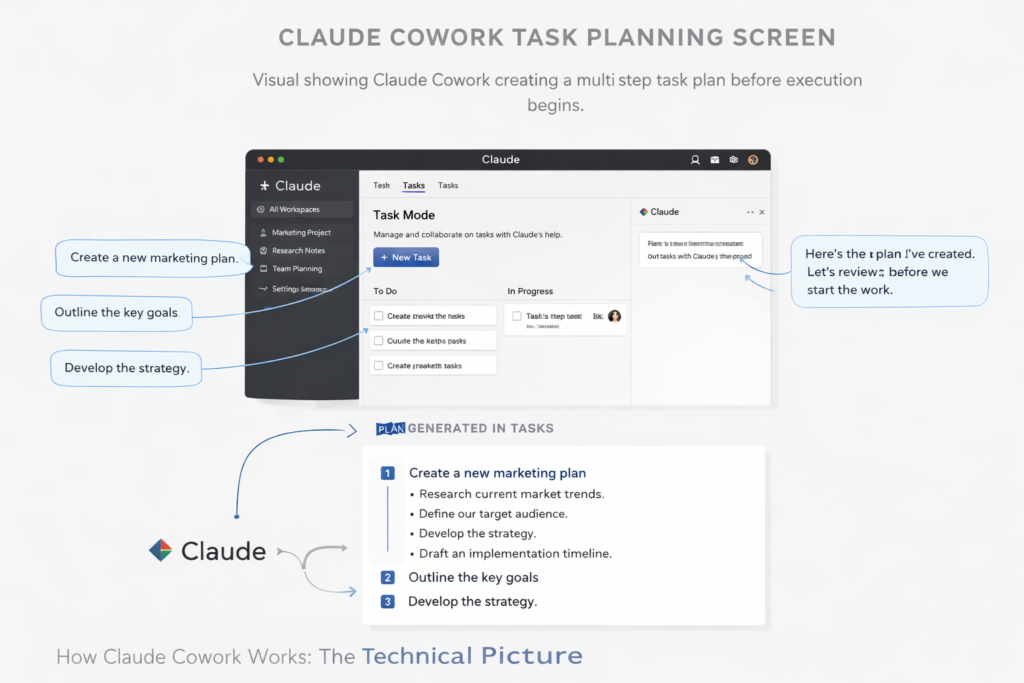
When you activate Cowork mode, you grant Claude access to a specific folder on your machine. From that point, Claude can read, create, edit, and organise files within that scope. It cannot access anything outside the permitted folder unless you explicitly add connections.
The execution model works in three phases: first, Claude creates a transparent task plan you can review before it begins; second, it executes in parallel workstreams when tasks allow; third, it surfaces checkpoints for your approval before taking any irreversible action — like sending an email or signing a document.
This design is intentional. Anthropic built human-in-the-loop checkpoints into Cowork specifically because business tasks often have downstream consequences.
1. KPI Report Generation
Upload your CRM export, analytics data, and any spreadsheets. Ask Cowork to generate a weekly performance summary in a structured format. What used to take 45–90 minutes of manual aggregation takes under five minutes.
2. Competitive Intelligence Briefs
Provide competitor websites, product pages, and any existing research. Cowork synthesises a structured comparison covering positioning, pricing, messaging, and feature gaps — formatted for immediate business use.
3. Proposal and RFP Drafting
Feed Cowork your previous proposal templates, the client brief, and any relevant reference material. It produces a structured first draft that retains your voice and adapts to the specific brief. Most users report cutting proposal time by 60–70%.
4. SOP Documentation
Convert meeting transcripts, voice notes, and operational instructions into clean, formatted Standard Operating Procedures. Cowork handles the structure, headings, step numbering, and formatting automatically.
5. Inbox and Document Triage
With Gmail integration active, Cowork can sort, summarise, and draft responses to emails in bulk. Pair this with Google Drive access and it can cross-reference documents when drafting replies — a genuine step beyond basic email AI.
As of February 2026, Claude Cowork supports direct integration with Google Drive, Gmail, DocuSign, and FactSet. An enterprise plugin marketplace has launched with third-party plugins for legal review, HR workflows, and financial analysis. Anthropic has confirmed integrations with Salesforce and additional CRM platforms are in development.
For businesses already running Google Workspace, the Drive and Gmail integrations alone create a compelling productivity case. Cowork can move between your inbox and your document library in a single task — something no previous AI tool managed natively.
Integration | What Cowork Can Do With It |
Google Drive | Read, create, edit, and organise files and folders |
Gmail | Read, summarise, draft, and send emails |
DocuSign | Prepare documents and initiate signing workflows |
FactSet | Pull structured financial data into reports |
Local File System | Full read/write within the granted folder scope |
Cowork is not a replacement for your automation platform. It is the intelligence layer that sits upstream. Think of the relationship this way: Cowork produces the output (the report, the document, the brief), and tools like Zapier or Make distribute and trigger actions on that output.
The highest-leverage businesses will combine Cowork with their automation stack: Cowork generates a weekly sales summary, Zapier automatically sends it to the right Slack channel and logs it in the CRM. Neither tool does both jobs — together, they complete the loop.
📌 PRO TIP: Set up a dedicated Cowork folder in Google Drive as the AI’s workspace. This keeps outputs organised, auditable, and easy to review before distribution.
| Plan | Monthly Cost | Cowork Access | Best For |
| Claude Pro | $20/month | Full access | Solo founders and freelancers |
| Claude Max | $100–$200/month | Full access, higher limits | Power users with heavy daily use |
| Claude Team | $30/user/month | Full access | Teams of 2–20 people |
| Claude Enterprise | Custom | Full access + admin controls | Organisations with governance needs |
Cowork is in research preview, which means some workflows are still being refined. A few practical limitations worth noting: tasks involving real-time web browsing are not yet supported natively inside Cowork (use Perplexity or a browser tool alongside it); very long-running tasks over multiple days are better suited to Perplexity Computer; and Cowork does not trigger external automations on its own — it still needs a human or automation platform to act on its outputs.
These are solvable limitations in a well-designed stack, not showstoppers. For the tasks it was built for — document work, research synthesis, and structured output generation — Cowork is the most capable tool in its category.
What is Claude Cowork?
Claude Cowork is an AI agent by Anthropic built into the Claude Desktop app. It executes multi-step business tasks autonomously — from organising files to generating reports — by accessing your local folders and connecting to tools like Google Drive, Gmail, and DocuSign.
Does Claude Cowork replace automation platforms like Zapier?
No. Cowork handles cognitive tasks — drafting, analysing, synthesising — but does not trigger or manage automated workflows between apps. Pair it with Zapier or Make for end-to-end automation.
Is Claude Cowork available on all Claude plans?
Yes. Cowork is included with all paid Claude plans: Pro ($20/month), Max ($100–$200/month), Team ($30/user/month), and Enterprise. It requires the Claude Desktop app on macOS or Windows.
How secure is Claude Cowork for business data?Cowork operates on your local machine and only accesses folders you explicitly grant access to. Enterprise plans include admin controls and audit logs. Anthropic recommends implementing internal permission policies before deploying across teams.
What integrations does Claude Cowork support?As of February 2026, Claude Cowork integrates with Google Drive, Gmail, DocuSign, and FactSet. An enterprise plugin marketplace is open for third-party developers, with early plugins covering legal review, HR, and financial analysis.