There’s a common trap that ambitious founders fall into in 2026: subscribing to every new AI tool that launches, then finding that nothing meaningfully changed. The problem is almost never the individual tools. It’s the absence of a system connecting them.
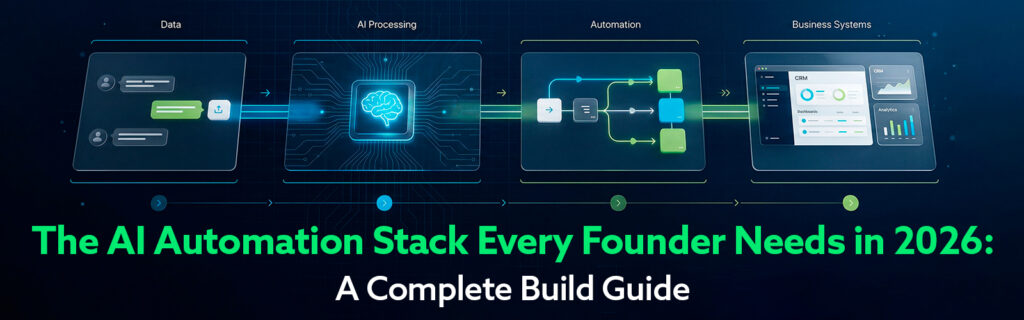
A stack is not a collection of subscriptions. It’s a set of tools where each one has a defined role, feeds into the next, and collectively handles a business function end-to-end without requiring your constant presence.
This guide walks you through building that system — from the foundational layer up.

Layer 1: Intelligence (AI Agents)
This is where thinking happens. AI agents produce the outputs your business runs on: reports, content, analysis, documents, and decisions. In 2026, the leading options for business owners are Claude (via Cowork or the standard chat interface), ChatGPT (OpenAI), and Perplexity for research-specific work.
Your intelligence layer should match your primary bottleneck. If you spend most time producing documents and operational content, lead with Claude Cowork. If research and market intelligence are your biggest time sinks, lead with Perplexity. If you need maximum versatility, ChatGPT is the most plug-and-play option.
Layer 2: Automation (Workflow Platforms)
This is where repeatable actions happen. Tools like Zapier and Make connect your apps and trigger actions automatically when defined conditions are met: when a new lead appears in your CRM, send a personalised welcome email; when a Cowork report is saved to Google Drive, post a notification to Slack.
AI agents and automation platforms are not competitors — they are complements. AI generates the intelligence; automation operationalises it. The best founder stacks connect both layers explicitly.
Layer 3: System of Record (CRM and Data)
Every business needs a single source of truth for its customer and operational data. Without a CRM, your AI tools are generating outputs with no permanent home. With a CRM, every AI-generated insight, report, and communication can be logged, tracked, and acted on systematically.
For most SMBs, Pipedrive (sales-focused, intuitive) or HubSpot (marketing-sales ecosystem) are the right choices. The specific platform matters less than the discipline of using it as the central record for everything your AI stack generates.
Layer 4: Distribution (Content and Comms Tools)
This layer gets your outputs in front of the right people. Email marketing platforms (Mailchimp, ActiveCampaign), social media schedulers (Buffer, Hootsuite), and project management tools (Notion, ClickUp) live here. Your AI intelligence layer feeds this layer — Pomelli generates the assets, Buffer distributes them.
Total for a lean but fully functional stack: approximately $100–120/month for a solo founder. This is the equivalent of roughly one hour of traditional agency time — and it runs continuously.
Layer | Recommended Tool | Monthly Cost | Primary Job |
Intelligence | Claude Pro (Cowork) | $20 | Document creation, analysis, task execution |
Intelligence | Perplexity Pro | $20 | Research, market intelligence, web synthesis |
Intelligence | Google Pomelli | Free | Marketing content and product photography |
Automation | Zapier Starter | $19.99 | Connecting apps and triggering workflows |
CRM | Pipedrive Essentials | $21.90/user | Sales pipeline and contact management |
Distribution | Buffer Essentials | $15 | Social media scheduling |
Distribution | Mailchimp Free / Paid | $0–$20 | Email marketing |
Week 1: Identify Your Bottlenecks
Before choosing tools, spend one week tracking where your time goes. Which tasks are routine but time-consuming? Where do you produce the most documents, do the most research, or spend the most time on communications? Your stack should target these bottlenecks specifically.
Week 2: Deploy Your Intelligence Layer
Start with one AI agent — whichever matches your primary bottleneck. Use it for that specific task category every day for a week. Build the habit before adding complexity.
Week 3: Connect Your Automation Layer
Set up Zapier or Make to automate the most repetitive handoffs in your workflow. Start with one or two Zaps: for example, ‘when a new Google Drive file is created in my Cowork folder, send me a Slack message’ or ‘when a new lead is added to Pipedrive, create a Cowork task to research them.’
Week 4: Measure and Extend
Review the time you’ve saved and the output quality you’ve achieved. What worked? What created friction? Extend what worked, remove what didn’t, and add one new layer (typically distribution).
What is an AI automation stack?
An AI automation stack is the combination of AI tools and workflow automation platforms a business uses together to handle repeatable tasks without manual intervention. A typical stack includes an AI agent (like Claude Cowork or ChatGPT) for content and analysis, a workflow tool (like Zapier or Make) for connecting apps and triggering actions, and a CRM for managing customer data.
What is the difference between AI agents and automation tools like Zapier?
AI agents perform cognitive tasks — writing, analysing, synthesising, deciding. Automation tools like Zapier connect apps and trigger predefined actions based on rules. The most powerful stacks use both: AI generates outputs, automation distributes and acts on them.
Which AI tools work best together for small businesses?
A high-performing SMB stack in 2026 typically combines Claude Cowork or ChatGPT for task execution, Perplexity AI for research, Google Pomelli for marketing content, and Zapier or Make for workflow automation. The right combination depends on your primary bottlenecks.
How much does a full AI automation stack cost?
A lean but capable AI automation stack can cost as little as $55–80/month: Claude Pro ($20), Zapier Starter ($19.99), and Perplexity Pro ($20). Adding Pomelli is free. Enterprise-level stacks with advanced tools can run $200–500/month for a team.
Do I need technical skills to build an AI automation stack?
No. All the tools mentioned in this article are designed for non-technical business owners. Zapier and Make have visual builders; Claude Cowork, ChatGPT, and Perplexity work through natural language. The biggest investment is time — building and testing your workflows over the first 30–60 days.